Securing your Internal Apps
 S
SSumit Kumar Tiwari
For homelabs, startups, internal tooling, and private infrastructure, Caddy + Tailnet is one of the cleanest networking stacks available today.
How Caddy and Tailnet Work Together: The Easiest Way to Secure Internal Apps
Modern self-hosting has a recurring problem: how do you expose internal services securely without fighting firewalls, SSL certificates, reverse proxies, and public IP addresses?
That’s where Caddy and Tailscale become an almost perfect combination.
Together, they let you:
Access private apps from anywhere
Automatically enable HTTPS
Avoid port forwarding
Reduce attack surface
Build secure internal platforms in minutes
This article explains how Caddy and a Tailnet work together under the hood, why the integration feels “magical,” and how you can use it in real-world setups.
First: What Is a Tailnet?
A tailnet is a private network created by Tailscale.
Every device connected to your Tailscale account joins this encrypted network and receives:
A stable private IP
A MagicDNS hostname
End-to-end encrypted connectivity via WireGuard
For example, your devices may get names like:
laptop.example.ts.net
server.example.ts.net
nas.example.ts.net
Instead of exposing services to the public internet, devices communicate securely inside the tailnet. (Tailscale)
What Caddy Brings to the Table
Caddy is a modern web server and reverse proxy famous for one thing:
HTTPS automatically works.
Normally, configuring HTTPS requires:
DNS setup
Let’s Encrypt
Reverse proxies
Certificate renewal automation
Caddy automates all of that.
But the really interesting part is its native integration with Tailscale.
Starting with Caddy 2.5, Caddy can automatically detect .ts.net domains and fetch TLS certificates directly from the local Tailscale daemon. (Tailscale)
That means your private tailnet services get trusted HTTPS without public exposure.
The Architecture: How They Work Together
Here’s the high-level flow:
User Device
    ↓
Tailnet (WireGuard encrypted)
    ↓
Caddy Reverse Proxy
    ↓
Internal Application
Caddy acts as the secure gateway.
Tailscale handles:
identity
encrypted networking
device discovery
private routing
Caddy handles:
HTTPS
reverse proxying
routing
headers
authentication integrations
Together, they create a zero-trust internal application platform.
The Magic: Automatic HTTPS Inside the Tailnet
Normally browsers complain about internal services because they lack valid TLS certificates.
Tailscale already encrypts traffic with WireGuard, but browsers still expect HTTPS certificates. (Tailscale)
This is where Caddy becomes powerful.
If your Caddyfile contains a .ts.net hostname:
server.example.ts.net {
    reverse_proxy localhost:3000
}
Caddy automatically:
Detects the Tailscale domain
Talks to the local
tailscaleddaemonRetrieves a trusted certificate
Renews it automatically
No manual cert management needed. (Tailscale)
Why This Is Better Than Traditional Reverse Proxy Setups
Traditional homelab setups often involve:
Nginx
DuckDNS
Cloudflare tunnels
Port forwarding
Dynamic DNS
Let’s Encrypt scripts
That works, but it increases operational complexity and internet exposure.
With Caddy + Tailscale:
Traditional SetupCaddy + TailnetOpen ports requiredNo port forwardingPublic internet exposurePrivate-only accessManual SSL setupAutomatic HTTPSDynamic DNS headachesMagicDNSFirewall complexityNAT traversal built-inPublic attack surfaceZero-trust private network
The result is dramatically simpler and safer.
Example: Hosting a Private Dashboard
Imagine you run:
Grafana
Home Assistant
Immich
Jellyfin
Portainer
Instead of exposing them publicly, you can:
Install Tailscale
curl -fsSL https://tailscale.com/install.sh | sh
tailscale up
Install Caddy
sudo apt install caddy
Configure Reverse Proxy
server.example.ts.net {

    reverse_proxy localhost:3000

}
Now any authenticated device in your tailnet can securely access:
https://server.example.ts.net
With:
encrypted transport
valid HTTPS
automatic cert renewal
no exposed ports
Under the Hood: How Caddy Gets Certificates
When Caddy sees a .ts.net hostname, it uses Tailscale’s local API socket to request certificates. (Tailscale)
Internally:
Caddy
  ↓
tailscaled local socket
  ↓
Tailscale certificate service
  ↓
Let's Encrypt-backed certificate
Tailscale manages the issuance flow while Caddy manages serving and renewal.
This only works if:
MagicDNS is enabled
HTTPS certificates are enabled in Tailscale admin settings (Tailscale)
Non-Root User Gotcha
A common issue appears when Caddy runs as the caddy user instead of root.
Caddy may fail to access the Tailscale socket.
The fix is:
TS_PERMIT_CERT_UID=caddy
inside:
/etc/default/tailscaled
Then restart Tailscale. (Tailscale)
This grants Caddy permission to retrieve certificates securely.
Beyond Basic Reverse Proxying
The integration can go much deeper.
The experimental caddy-tailscale plugin allows Caddy itself to become a Tailscale node. (Tailscale)
This enables:
Tailnet-native listeners
Tailscale-authenticated access
Reverse proxying between tailnet nodes
Embedded Tailscale networking
Identity-aware applications
In some architectures, you don’t even need a separate Tailscale daemon anymore.
Real-World Use Cases
1. Homelab Security
Keep services completely private while still accessible remotely.
Perfect for:
Home Assistant
NAS dashboards
Internal admin tools
2. Developer Platforms
Expose staging apps privately to teammates without public deployment.
staging.internal.ts.net
No VPN appliance required.
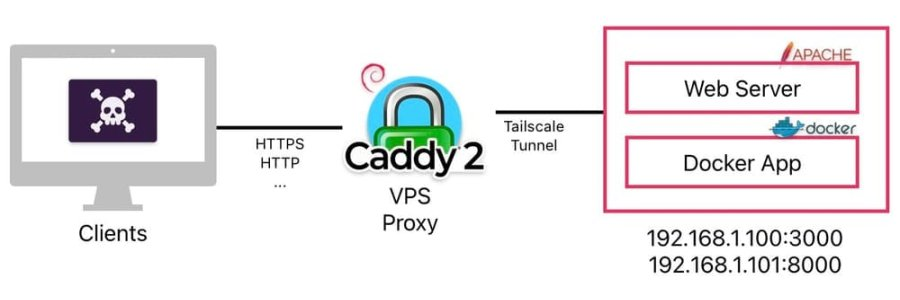
3. VPS Gateway Architecture
Some users run:
public VPS with Caddy
internal services over Tailnet
Caddy becomes the internet-facing gateway while backend apps stay private inside Tailscale. (Reddit)
4. Multi-Service Reverse Proxy
Caddy can route multiple services:
grafana.example.ts.net {
    reverse_proxy localhost:3000
}

jellyfin.example.ts.net {
    reverse_proxy localhost:8096
}
Everything stays secured inside the tailnet.
Community Feedback
One reason this stack has become popular is because it removes enormous operational overhead.
Many self-hosters describe it as “just works.” (Caddy Community)
Common praise includes:
almost zero SSL management
easy mobile access
no public exposure
simple onboarding for family/team members
The biggest pain points usually involve:
DNS resolution issues
permissions for accessing Tailscale sockets
misunderstanding that
.ts.netdomains are required for automatic cert handling (Reddit)
Limitations to Know
This setup is fantastic, but not perfect.
Tailnet-only Access
Your services are private unless users install Tailscale.
That’s intentional.
.ts.net Requirement
Automatic certificate integration only works with Tailscale hostnames. (Tailscale)
HTTPS Must Be Enabled
You must enable:
MagicDNS
HTTPS certificates
inside the Tailscale admin console. (Tailscale)
Experimental Advanced Plugins
The deeper caddy-tailscale integrations are still experimental. (Tailscale)
For production environments, many people still prefer the standard:
Tailscale daemon
standard Caddy reverse proxy
Final Thoughts
Caddy and Tailscale solve complementary problems beautifully.
Tailscale gives you:
secure networking
identity-aware connectivity
private infrastructure
Caddy gives you:
automatic HTTPS
elegant reverse proxying
minimal configuration
Combined, they remove much of the traditional complexity of self-hosting.
Instead of building layers of:
VPN appliances
firewall rules
SSL automation
public ingress infrastructure
…you can deploy secure internal services with a few lines of configuration.
For homelabs, startups, internal tooling, and private infrastructure, Caddy + Tailnet is one of the cleanest networking stacks available today.
Comments
Loading comments…
Sign in to leave a comment.